Nine mistakes in one campaign. One alert, 16 seconds later.
Add our two addresses to your list, like any subscriber. We check every email that reaches them the moment it lands. When one goes out wrong, we email you what’s wrong and what to do.
2Problem 2 in the alert: Subject and code disagree
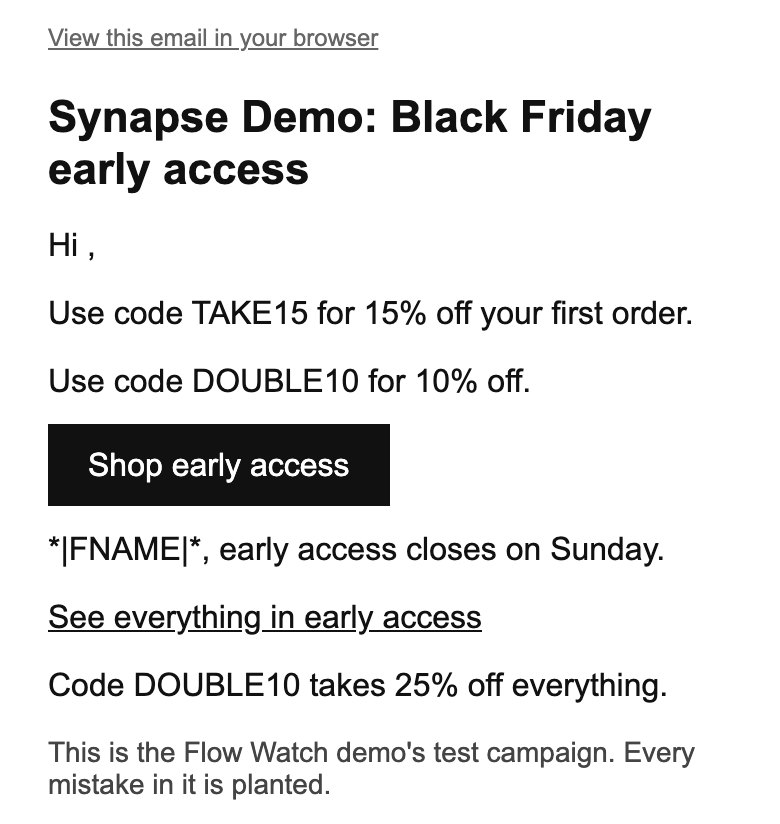
The subject line says 20% off, but the code TAKE15 gives 15% off.
What to do: Make the subject line and the code give the same discount. Otherwise a subscriber who opens for 20% is given a code for 15%.
Only in the copy to our address without a first name.
1Problem 1 in the alert: Proof it's from you
This email from synapseretention.com failed the check that proves it really came from you. Gmail says mail that breaks its rules may not arrive, or may land in spam.
What to do: Turn on a branded sending domain: it proves emails come from your web address.
6Problem 6 in the alert: Links that go nowhere
The link “View this email in your browser” goes nowhere: it points to “*|ARCHIVE|*”. It's how Mailchimp writes a fill-in field, which your platform doesn't fill in.
What to do: Point it at your email platform's own “view in browser” link, or take it out.
9Problem 9 in the alert: A greeting with no name
The greeting reads “Hi ,” for subscribers who didn't give a first name.
What to do: Give the name a fallback, like “there”, so it reads “Hi there,”.
Only in the copy to our address without a first name.
2Problem 2 in the alert: Subject and code disagree
The subject line says 20% off, but the code TAKE15 gives 15% off.
What to do: Make the subject line and the code give the same discount. Otherwise a subscriber who opens for 20% is given a code for 15%.
Only in the copy to our address without a first name.
4Problem 4 in the alert: One code, two discounts
The code DOUBLE10 is given two different discounts in one email: 10% off and 25% off.
What to do: Give the code one discount everywhere, and check which one it takes at checkout.
5Problem 5 in the alert: Discount links without a code
The link “Shop early access” applies the code “CODE”, not a real code.
What to do: Put the real code in the link, where it says CODE.
8Problem 8 in the alert: Text subscribers shouldn't see
Subscribers see “*|FNAME|*” where their first name should be. It's how Mailchimp writes a fill-in field, which your platform doesn't fill in.
What to do: Use your email platform's own first-name field, with “there” for people without a name.
7Problem 7 in the alert: Links that may not open
Some email apps may not open the link “See everything in early access”: no https:// at its start.
What to do: Change it to https://www.synapseretention.com/early-access so every email app opens it.
4Problem 4 in the alert: One code, two discounts
The code DOUBLE10 is given two different discounts in one email: 10% off and 25% off.
What to do: Give the code one discount everywhere, and check which one it takes at checkout.
Black Friday early access: 20% off everything
S
Synapse Demo
demo@synapseretention.com
To our address with a first name ·
3Problem 3 in the alert: Subject and email disagree
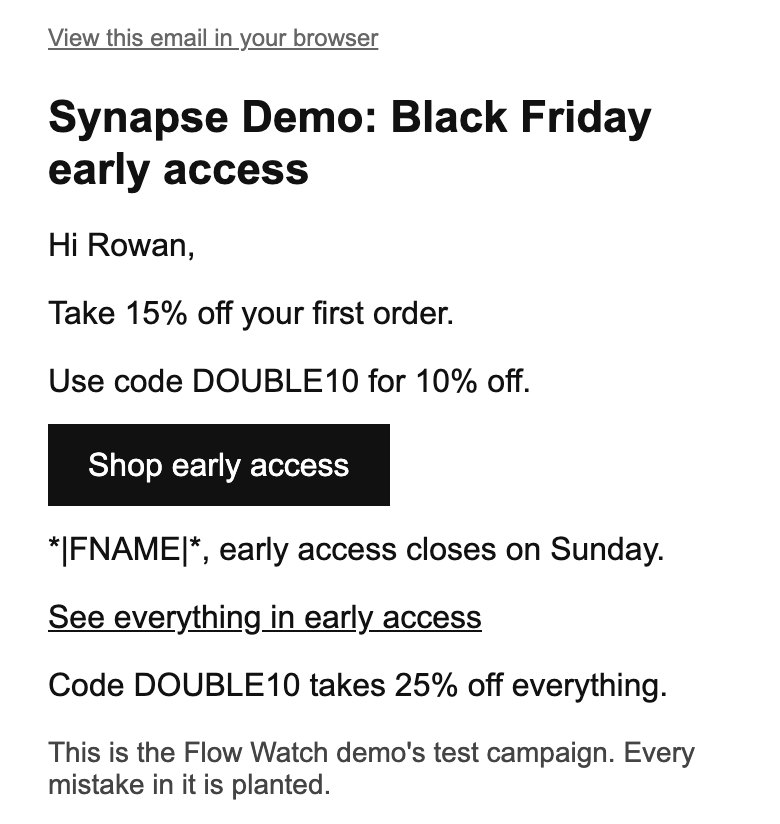
The subject line says 20% off, but the email says 15% off.
What to do: Make the subject line and the email give the same discount.
Only in the copy to our address with a first name.
1Problem 1 in the alert: Proof it's from you
This email from synapseretention.com failed the check that proves it really came from you. Gmail says mail that breaks its rules may not arrive, or may land in spam.
What to do: Turn on a branded sending domain: it proves emails come from your web address.
6Problem 6 in the alert: Links that go nowhere
The link “View this email in your browser” goes nowhere: it points to “*|ARCHIVE|*”. It's how Mailchimp writes a fill-in field, which your platform doesn't fill in.
What to do: Point it at your email platform's own “view in browser” link, or take it out.
3Problem 3 in the alert: Subject and email disagree
The subject line says 20% off, but the email says 15% off.
What to do: Make the subject line and the email give the same discount.
Only in the copy to our address with a first name.
4Problem 4 in the alert: One code, two discounts
The code DOUBLE10 is given two different discounts in one email: 10% off and 25% off.
What to do: Give the code one discount everywhere, and check which one it takes at checkout.
5Problem 5 in the alert: Discount links without a code
The link “Shop early access” applies the code “CODE”, not a real code.
What to do: Put the real code in the link, where it says CODE.
8Problem 8 in the alert: Text subscribers shouldn't see
Subscribers see “*|FNAME|*” where their first name should be. It's how Mailchimp writes a fill-in field, which your platform doesn't fill in.
What to do: Use your email platform's own first-name field, with “there” for people without a name.
7Problem 7 in the alert: Links that may not open
Some email apps may not open the link “See everything in early access”: no https:// at its start.
What to do: Change it to https://www.synapseretention.com/early-access so every email app opens it.
4Problem 4 in the alert: One code, two discounts
The code DOUBLE10 is given two different discounts in one email: 10% off and 25% off.
What to do: Give the code one discount everywhere, and check which one it takes at checkout.
Synapse Retention
Campaign sent · Alert sent
Synapse Demo: 9 problems in “Black Friday early access: 20% off everything”
Our own test campaign, sent from our Klaviyo account on 9 October 2026. Its mistakes were planted. This is the copy our address without a first name received.This is the copy our address with a first name received. Choose a number to read what the alert said.
What the alert said, 16 seconds later
The most costly first, in the alert’s own words. Point at one to find it on the phone.
1
Proof it's from you
This email from synapseretention.com failed the check that proves it really came from you. Gmail says mail that breaks its rules may not arrive, or may land in spam.
What to do: Turn on a branded sending domain: it proves emails come from your web address.
2
Subject and code disagree
The subject line says 20% off, but the code TAKE15 gives 15% off.
What to do: Make the subject line and the code give the same discount. Otherwise a subscriber who opens for 20% is given a code for 15%.
Only in the copy to our address without a first name.
4
One code, two discounts
The code DOUBLE10 is given two different discounts in one email: 10% off and 25% off.
What to do: Give the code one discount everywhere, and check which one it takes at checkout.
6 more problems in this alert
3
Subject and email disagree
The subject line says 20% off, but the email says 15% off.
What to do: Make the subject line and the email give the same discount.
Only in the copy to our address with a first name.
5
Discount links without a code
The link “Shop early access” applies the code “CODE”, not a real code.
What to do: Put the real code in the link, where it says CODE.
6
Links that go nowhere
The link “View this email in your browser” goes nowhere: it points to “*|ARCHIVE|*”. It's how Mailchimp writes a fill-in field, which your platform doesn't fill in.
What to do: Point it at your email platform's own “view in browser” link, or take it out.
7
Links that may not open
Some email apps may not open the link “See everything in early access”: no https:// at its start.
What to do: Change it to https://www.synapseretention.com/early-access so every email app opens it.
8
Text subscribers shouldn't see
Subscribers see “*|FNAME|*” where their first name should be. It's how Mailchimp writes a fill-in field, which your platform doesn't fill in.
What to do: Use your email platform's own first-name field, with “there” for people without a name.
9
A greeting with no name
The greeting reads “Hi ,” for subscribers who didn't give a first name.
What to do: Give the name a fallback, like “there”, so it reads “Hi there,”.
Only in the copy to our address without a first name.
Emails read for the Market, from 678 brands. Counted .
8
Permissions in Klaviyo, all read-only
What you get
Three kinds of check, and a view of your market. You see all of it in one place.
Alerts, as each email lands
Campaigns, your welcome, and test sends to your proof address.
Synapse Retention watch@synapseretention.com
Synapse Demo: 9 problems in “Black Friday early access: 20% off everything”
Synapse Demo (synapseretention.com) sent an email with 9 problems. The most costly first.
“Black Friday early access: 20% off everything” Campaign · arrived Fri 9 Oct at 20:23 Vienna time · to 2 of our addresses
Proof it's from you This email from synapseretention.com failed the check that proves it really came from you.
Subject and code disagree The subject line says 20% off, but the code TAKE15 gives 15% off.
Our test’s alert, in the words our alerts use today.
Inside your Klaviyo account, every night
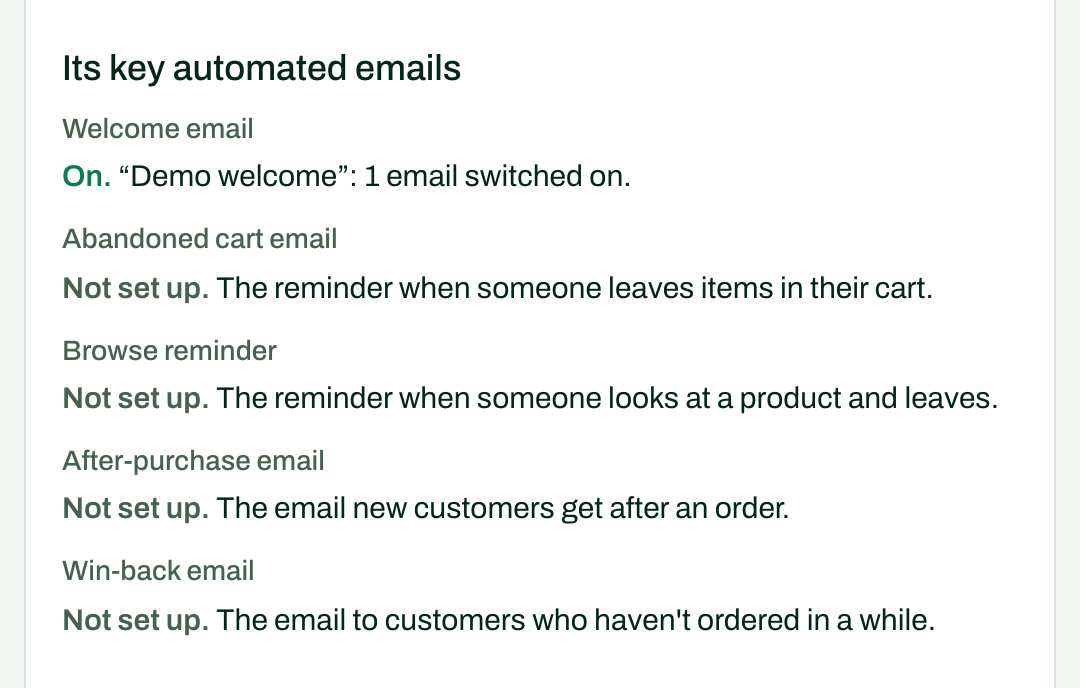
Which key automated emails are on. The offers in automated emails, and in scheduled campaigns every 15 minutes. Spam reports, bounces and unsubscribes. Every 2 hours we check that your store’s orders still reach Klaviyo.
Our demo agency’s test brand, as its page shows it.
A report on the 1st of each month
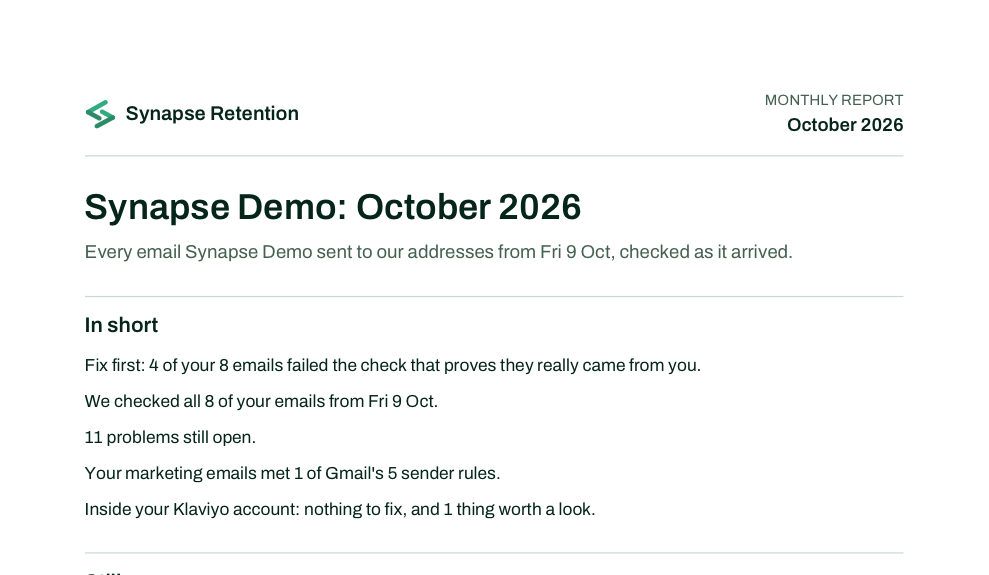
What’s still open, what we no longer see, the offers you sent and how your market moved. As a page, and as a PDF.
The first page of our demo’s October report, as it stood on 13 October.
The Market, and a Monday email
What the brands we follow send each week, by category. Switch on the Monday email for the week’s biggest moves. Since 7 October 2026, we only join a list with the brand’s permission.
From one Monday email, for to
4
brands started Christmas
70%
off at most, in Supplements & nutrition
For stores, and for the agencies that run their email.
One plan for a store’s own email. One for an agency with many clients.
An online store
You send your store’s email yourself, on any platform.
You run email for several stores. Every client sits in one place, and each month’s reports carry your name and logo. Your clients connect Klaviyo with a link you send.
Any. We check the emails themselves, so it doesn’t matter what sends them. Connecting an account works with Klaviyo.
Which of our emails do you see?
Every email that reaches our two addresses: campaigns to their list, and your welcome. Reminders after a visit or an order don’t reach them. Connect Klaviyo, and we check those inside your account.
Can we check a campaign before it goes out?
Yes. Send a test to your proof address, and we check it the moment it arrives. You see what we found on your brand’s page.
Do you check our welcome emails?
Yes, every one that reaches us. When your welcome changes, ask for a welcome test. We give you a fresh address to add to your list. Then we check each welcome email arrives, and on time.